.png)


.svg "DynaTechOps")
Key Takeaways
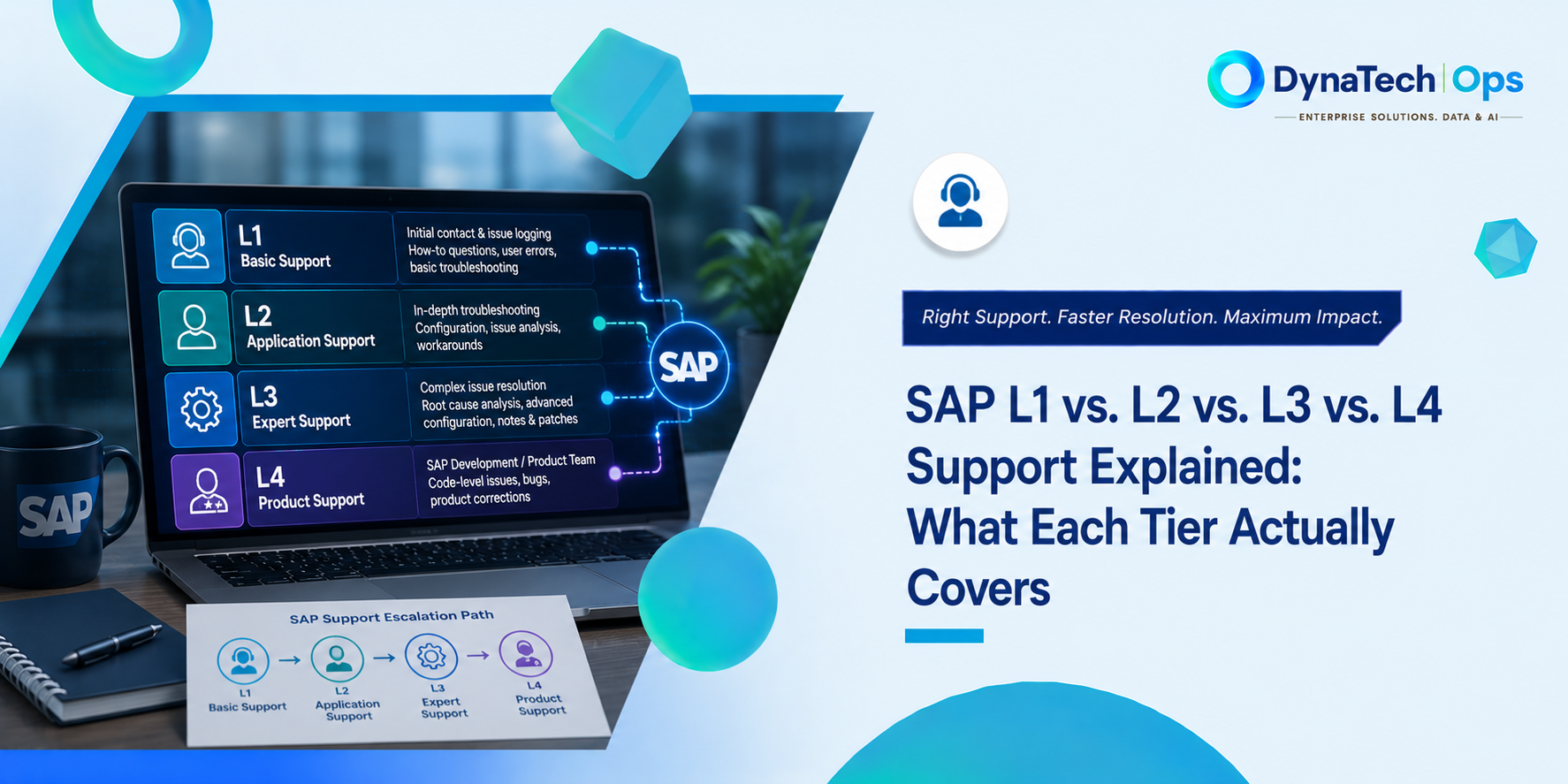
- SAP support is typically organised into three tiers: L1, L2, L3 and L4. Each tier handles a different level of issue complexity.
- L1 manages user issues and basic troubleshooting. L2 deals with functional and configuration problems. L3 handles advanced technical and development issues.
- Some SAP support models also use a fourth level, L4, to escalate to SAP or another product vendor when the issue needs vendor-level expertise.
- Support performance should be evaluated using key metrics such as first-contact resolution, escalation rates, ticket aging, and repeat incidents, as fixed benchmarks may not suit all SAP environments.
- Confusion often arises about what each support tier covers. Understanding these levels can help businesses evaluate an SAP support provider more effectively.
Introduction
If you have ever discussed SAP managed services with a provider, you may have heard terms like L1, L2, and L3 support used quite often. But what do these levels mean? For many business leaders and SAP users, the answer is not always clear.
These labels describe the SAP L1, L2, L3 support tiers and show how support teams handle issues based on their complexity.
Many SAP resources use technical language to explain support levels, but few clarify them for general understanding. This blog simplifies SAP L1, L2, L3, and covers L4 support, which may involve escalation to SAP.
What Is L1 Support in SAP?
If you are wondering what is L1 support in SAP, it is the first point of contact when a user faces an issue in an SAP environment.
L1's main role is to understand problems, perform checks, and resolve common issues. If more expertise is needed, L1 gathers details and escalates the ticket to the right support team.
Common examples of L1 support include:
- “I can't log in to SAP.”
- “I forgot my password.”
- “I cannot access a particular transaction.”
- “How do I complete this basic SAP task?”
- “My approval is not going through.”
- “I am getting an error while completing a routine process.”
- “This report does not look right.”
For example, if a user cannot log in, L1 checks account issues, guides the user, and if approval fails, searches for known problems before escalating. L1 also triages by understanding the problem, recording the ticket, assessing urgency, and deciding if it can be resolved at this level.
When a problem involves deeper SAP configuration, a business process, an integration, or another complex issue, it can move to L2 support.
In simple terms, L1 support provides the first response, basic troubleshooting, and initial ticket assessment. Its goal is to resolve straightforward issues quickly while making sure more complex problems reach the right team.
What Is L2 Support in SAP?
If you are asking what is L2 support in SAP, it is the support level that handles issues requiring deeper functional and configuration expertise.
The key difference between L1 and L2 is simple: L1 identifies and handles the problem at a basic level, while L2 investigates what is causing the problem within the SAP module or business process.
For example, L1 may receive a ticket saying, “My invoice is not getting posted.” L1 can check for common errors and gather relevant details. L2 can then investigate SAP configuration, business rules, master data, or process settings that may prevent the invoice from posting.
L2 support can involve different SAP modules, such as:
- FI: Financial Accounting issues
- MM: Materials Management and purchasing-related issues
- SD: Sales and distribution processes
- PP: Production planning issues
- HCM: Human resources and employee-related processes
The exact responsibilities depend on the SAP environment and the support agreement. However, L2 typically handles functional and configuration-related issues that require someone who understands how the relevant SAP module is configured and used.
Understanding the SAP L1, L2, L3 support tiers also make it easier to see where functional expertise fits into the support model.
What Is L3 Support in SAP?
L3, or Level 3 support, handles complex technical issues requiring specialist expertise. It is usually the highest support level before vendor escalation.
Understanding what is L3 support in SAP also helps explain why this level involves developers and technical specialists rather than only functional consultants.
L2 differs from L3 in the depth and type of investigation. L2 mainly handles functional and configuration issues, while L3 includes advanced analysis, development, custom code, and deeper root-cause investigation.
For example, L2 may determine that an SAP process is failing even though the configuration is correct. L3 may then investigate the underlying custom code or technical component causing the failure.
L3 support can include:
- Custom ABAP code investigation and fixes
- Complex integration issues
- System-level troubleshooting
- Advanced performance issues
- Technical debugging
- Root-cause analysis of recurring incidents
- Development-level corrections
L3 is particularly important when an issue cannot be resolved by standard configuration changes. A developer, a senior SAP technical specialist, or another subject-matter expert may need to examine the system more deeply.
The 4th Tier Almost Nobody Explains: L4
Most explanations of SAP support stop at L3. But what happens when the L3 team cannot resolve the problem?
This is where SAP L4 support can come into the picture. In some support models, L4 means escalating an issue beyond the AMS provider to the original software vendor or product developer.
For SAP, this involves escalating the issue directly through support channels if it relates to the standard SAP product. L4 is not a universal SAP support tier; some models use it for vendor-level escalation.
The 4th Tier Almost Nobody Explains: L4
Most explanations of SAP support stop at L3. But what happens when the L3 team cannot resolve the problem?
This is where SAP L4 support can come into the picture. In some support models, L4 means escalating an issue beyond the AMS provider to the original software vendor or product developer.
For SAP, this involves escalating the issue directly through support channels if it relates to the standard SAP product. L4 is not a universal SAP support tier; some models use it for vendor-level escalation.
When Does an Issue Reach L4?
An issue may need L4 escalation when:
- The L1, L2, and L3 teams have completed their investigation.
- The problem is not caused by user access or basic errors.
- We checked SAP configuration, and it does not appear to be the cause.
- We investigated custom code and integrations.
- The issue appears to be a defect in standard SAP software.
An AMS provider may investigate an SAP error through L1, L2, and L3, checking user access, configuration, custom code, integrations, and environment. If they find the issue is caused by standard SAP software, they may need to escalate the case to SAP.
How Is L4 Different from L1, L2 and L3?
The key difference is where the issue goes for resolution.
- L1: First-line support and basic troubleshooting
- L2: Functional and configuration-level investigation
- L3: Advanced technical and development-level investigation
- L4: Vendor-level escalation to SAP when required
L4 is crucial for suspected SAP defects. SAP investigates and offers corrections, workarounds, SAP Notes, or guidance, based on the situation.
Unlike L1, L2, and L3, SAP L4 support can involve escalating an issue directly to SAP when the problem appears to be related to the standard SAP product.
Does Your AMS Provider Have a Clear L4 Path?
When evaluating an SAP AMS provider, ask what happens when an issue reaches the limits of L3.
A clear SAP support escalation process should explain:
- Who raises the case with SAP
- What information and evidence must be provided
- Who tracks the SAP support case
- How updates are communicated to the customer
- How the issue is brought back into the normal support process
Without a clear path beyond L3, complex product issues can stay unresolved as internal teams investigate. A defined L4 escalation route ensures issues needing SAP's expertise have a clear next step.
Walking a Real Ticket Through All Three Tiers
A real-world example clarifies L1, L2, and L3. For instance, a sales team using SAP notices a sales order total is incorrect and raises a support ticket when the amount doesn't match the expected value. This example shows how the SAP L1, L2, L3 support tiers work together as an issue requires deeper investigation.
L1: Understanding the Problem
The ticket first reaches L1 support. The team does not immediately investigate complex SAP settings. Instead, it starts with basic checks.
The L1 team may:
- Confirm what the user was trying to do.
- Check the exact error or incorrect result.
- Confirm whether the issue affects one user or several users.
- Check whether the user has the required access.
- Verify that the user followed the correct transaction and process.
- Look for a known issue or documented solution.
- Record screenshots and other relevant details.
The checks show that the user has the correct access and is following the right process. Other users are also seeing the incorrect total.
At this point, the issue is clearly not a simple user or access problem. L1 escalates the ticket to L2 with the information already collected.
L2: Finding the Functional or Configuration Issue
L2 support has deeper knowledge of the relevant SAP module and business process. The team now investigates why the sales order is producing the wrong total.
The L2 team checks areas such as:
- Pricing conditions
- Pricing procedures
- Relevant configuration settings
- Customer and material data
- Business rules affecting the calculation
- Recent configuration changes
The investigation shows that a pricing condition has been configured incorrectly. This is causing the sales order to calculate the total incorrectly.
L2 corrects the configuration and retests the sales order. If the total is correct, L2 can resolve the issue. If the total remains incorrect despite correct configuration, further technical investigation is needed.
L3: Finding the Technical Root Cause
The ticket moves to L3 support, where specialists with advanced expertise investigate system logic, reviewing technical logs, custom developments, integrations, and code involved in calculating the sales order value.
The team finds a custom ABAP enhancement alters calculations under certain conditions. Standard SAP works fine, but custom code yields incorrect results.
The L3 developer corrects the code and tests the sales order in different scenarios to ensure the change doesn't cause problems. Once testing confirms the calculation works correctly, the ticket can move toward resolution.
What This Ticket Shows
The same issue can require three different types of support:
| Support Level | What the Team Does in This Example |
|---|---|
| L1 | Confirms the problem, checks basic causes and gathers information |
| L2 | Investigates the SAP process and identifies a configuration issue |
| L3 | Investigates custom code and fixes the underlying technical problem |
The important point is that L1, L2, and L3 do not simply represent three levels of seniority. Each tier has a different purpose.
- L1 asks, “What is happening?”
- L2 asks, “Is there a functional or configuration reason for it?”
- L3 asks, “Is there a deeper technical or development reason?”
This is why a clear SAP support escalation process matters. It helps the ticket reach the right expertise without sending every issue directly to a highly specialised team.
This example shows how the SAP L1, L2, L3 support tiers work together as an issue requires deeper investigation.
How to Tell If a Provider's Tier Structure Is Actually Healthy
Knowing what L1, L2, and L3 mean is useful, but it doesn't indicate if an SAP support model works well. A provider may have support tiers but still have many tickets switching between them.
Buyers should ask: How well does the provider use each support level? Two metrics can help evaluate this.
Ask About L1 First-Contact Resolution
First-contact resolution measures how many support tickets L1 resolves on the first interaction without escalation. A higher rate indicates the L1 team has the right knowledge, tools, and access to resolve common issues.
A 2026 Support bench analysis suggests a healthy L1 function should aim to resolve around 70–80% of tickets on first contact.
Ask a prospective provider: “What percentage of eligible tickets does your L1 team resolve without escalation?”
The answer gives you a better picture of how effectively the first support layer is working.
Ask How Many Tickets Reach L3
L3 is designed for complex technical problems. It should not become the default destination for everyday support issues.
If a large share of tickets regularly reaches L3, it may be worth understanding why. The cause could be:
- L1 lacks sufficient knowledge or documentation.
- L2 lacks the required functional expertise.
- Recurring issues are not being addressed at their root.
- The SAP environment has significant customisation.
- Complex technical problems are genuinely common in that environment.
Industry analysis in 2026 cited 5–10% of total ticket volume as a warning range for L3 escalation, but this varies by organisation and SAP landscape. The key question is not just whether the percentage exceeds a specific number.
Ask: “What percentage of your total tickets reach L3, and what are the main reasons they are escalated?”
A provider should be able to explain the number and show how recurring L3 issues are being reduced.
3. Look Beyond the Numbers
Good support is not only about keeping escalation percentages low.
A healthy tier structure should also have:
- Clear ownership at every support level
- Defined escalation rules
- Appropriate SLAs for different issue types
- Good documentation and knowledge sharing
- Regular analysis of recurring incidents
Most importantly, the provider should be able to explain why tickets move between levels. If a provider cannot clearly tell you it's L1 first-contact resolution rate or the percentage of tickets reaching L3, that is worth noting.
Quick Comparison: L1 vs. L2 vs. L3 vs. L4
The four support levels can be understood by comparing what each team handles and when issues escalate. The appropriate tier depends on the problem's nature, not just its perceived severity.
The table below provides a quick comparison of the SAP L1, L2, L3 support tiers and the additional L4 escalation level.
| Tier | Who Handles It | Typical Issue | Example |
|---|---|---|---|
| L1 | Frontline support agents | Basic, user-facing issues | Password reset or access request |
| L2 | Functional or module specialists | Functional and configuration-level issues | Incorrect pricing calculation caused by configuration |
| L3 | Developers and technical experts | Custom code, advanced technical issues, and root-cause investigation | Bug in custom ABAP logic |
| L4 | SAP or the relevant product vendor | Product-level issues requiring vendor expertise | A standard SAP function behaving incorrectly |
Frequently Asked Questions
1. What is the difference between L1, L2, and L3 support in SAP?
L1 manages basic user issues, initial troubleshooting, and ticket triage. L2 addresses deeper functional and configuration problems within SAP modules. L3 handles advanced technical issues, custom code, development problems, and complex root-cause analysis.
2. What is L4 support in SAP?
SAP L4 support refers to vendor-level escalation in support models that use a fourth tier. For SAP, this can mean escalating an issue to SAP when it appears to be a product-level problem that the AMS provider cannot resolve. L4 is not a universal SAP-defined support tier.
3. What percentage of SAP tickets should reach L3?
No single percentage applies to all SAP environments. A high L3 volume may signal many escalations or a complex SAP landscape. Benchmarks suggest 5–10% of total tickets as a trigger, but always consider ticket types, SAP landscape, customisation, and support scope.
4. Is SAP AMS L1, L2, L3 support included in one contract, or billed separately?
Support levels and charges differ by AMS provider and contract, with some including L1, L2, and L3 support, while others charge based on scope, service levels, ticket volume, modules, or specialist services. Buyers should review contracts to understand support inclusion and extra charges.
Related Terms
- SAP AMS
- SAP AMS: The Complete Guide
- SAP Managed Services (AMS)
See How SAP Support Tiers Work in Practice
Curious what your current AMS provider's real tier breakdown looks like? Explore how DynaTechOps.ai structures SAP support from L1 through L4.